Context
For the last 3 years, we have used Terraform to manage our cloud infrastructure. Infrastructure as Code (IaC) tools, like Terraform, improve stability, security, and agility by making infrastructure changes repeatable and auditable. The main advantages of Terraform over other IaC tools are its multi-cloud support and widespread adoption.
To ensure quality, all code (including IaC) is first deployed to a production-like development environment, then promoted into the production environment after testing is complete. To manage this process, we use “dev” and “prod” branches in our version control system. This ensures all changes pass through dev on their way to production and makes it very easy to see the differences prior to each production deployment. Plus, junior team members can develop and submit pull requests without the need for production credentials.
Challenge
In addition to the core IaC files, environment specific variables and provider configurations (like account IDs) are required at runtime to “apply” the changes to the target environment. In order to manage these configurations, we implemented a simple script and repository design to keep everything (except secrets) in version control and to ensure the configuration is always in sync with the code. This design is broadly applicable and has served us well for the last 3 years.
Solution
First, all relevant Terraform code is put into folders with one layer of nesting (e.g. analytics/database, analytics/jobs, core/network, core/apis). Note: Each folder containing Terraform code has its own Terraform state file (saved to cloud storage) which helps to reduce the risk of mistakes, improve collaboration, and improve performance when managing large amounts of resources.
Second, we created a “_configuration” directory with one folder per environment and a standard naming scheme for 1) a “.tf” file containing provider and state configurations and 2) a “.tfvars” file containing environment specific values. Each folder containing Terraform code has a corresponding “.tf” and “.tfvars” file.
Third, we created an “init” script that dynamically symlinks these files from the “_configuration” directory into their respective directories based on a selected environment (e.g. dev or prod).
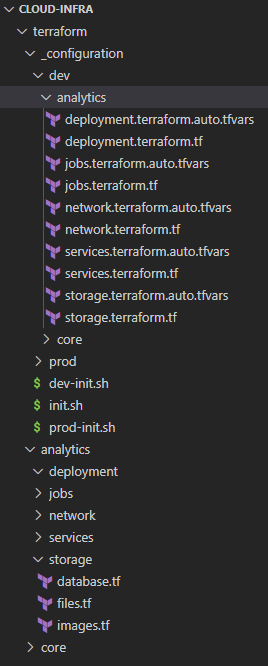
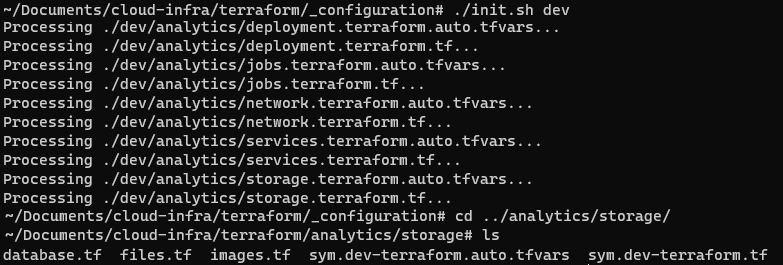
In practice, we have a local copy of each branch (one for each environment) and only run the init script when a new subfolder is added, a new environment is added, or a new team member joins. On a day to day basis, we simply switch between local copies and use git commands to move code between environments (e.g. cd cloud-infra-prod, git fetch, git merge origin/dev –ff-only, terraform apply, git push”.
Note: A zip with the directory structure and script can be found at the bottom of this page.
Potential Improvements
This design could support personal test environments for each person and pull requests from personal forks, but the extra infrastructure costs of personal environments have not been justified so far.
Additionally, a tool like Atlantis could be used to auto-deploy from each branch, but our team is small enough that the extra complexity has not been worth it.
Files
#!/bin/bash
#Place file in: terraform/_configuration
#Create terraform code directories with path: terraform/{main_dir}/{sub_dir}
#add one .tf file and one .tfvars file for each sub_dir with the paths:
#  terraform/_configuration/{environment}/{main_dir}/{sub_dir}.terraform.auto.tfvars
#  terraform/_configuration/{environment}/{main_dir}/{sub_dir}.terraform.tf
#Run this script with environment as the first argument to reset symlinks: cd terraform/_configuration; ./init.sh dev
#See attached zip for example directory structure

env=$1

#Delete all existing symlinks
find ../ -type l -name 'sym.*' -delete

#Create symlinks
for relative_file_path in $(find "./$env/" -type f -name "*"); do
  echo "Processing $relative_file_path..."
  filename=(${relative_file_path//\// })
  account=(${filename[2]//./ })
  split_components=(${filename[3]//./ })
  tier=${split_components[0]}
  file_name=${split_components[1]}
  file_path=${split_components[2]}
  file_path2=""

  if [ ${#split_components[@]} -gt 3 ]; then
    file_path2=".${split_components[3]}"
  fi

  symlink_location="../$account/$tier/sym.$env-$file_name.$file_path$file_path2"

  ln -s "$(realpath $relative_file_path)" $symlink_location
done Trellis Engineering Blog